
Most conversations about workplace search assume the answer lives in one document. Multi-source search starts from a different assumption: that it usually doesn't. Here's what that looks like in practice.
A new store manager is in her second week. A customer arrives at the till with a jacket, no receipt and a reasonable story. She types "return without receipt" into the intranet and finds the returns policy, a tidy PDF that says store credit only. She applies it and moves on.
Except that wasn't the whole answer.
She found one piece, assumed it was everything, and got it partly wrong. Nobody was careless. The answer was simply split across four formats in four different places.
Which raises a question most organisations haven't asked yet: what if the answer you need is split across a PDF, a video and a dashboard?

Ten years ago, most of what an organisation knew was written down. Today it's just as likely to be recorded. Training happens on video. Decisions are made on calls that someone remembered to record. Product knowledge lives in webinars, slide decks and eLearning modules, and performance lives in dashboards.
All of this is unstructured data, and it now makes up the bulk of what businesses hold. An IDC white paper sponsored by Box found that 90% of an organisation's data is unstructured, covering everything from contracts and handbooks to recordings and images.
The trouble is that each format tends to live in its own system, with its own search or none at all:
Traditional unified enterprise search was built mainly for text, so unstructured data search has lagged furthest behind in exactly the formats that grew fastest. Most AI knowledge management projects still start, and stop, with documents.
We've written before about the hidden cost of unsearchable video and audio on its own. The bigger problem is what happens when every format holds a different piece of the same answer.
When people have to search one system at a time, four things tend to happen.
They stop at the first plausible result. If the PDF looks like an answer, few people go on to check the learning platform, the meeting recordings and the dashboard as well. Nobody has the time, and nothing tells them the answer is incomplete.
Video and audio get skipped entirely. If you can't search what was said in a recording, you'll only find it if you already know it exists and roughly when it was said.
Context never meets policy. The dashboard shows how often something happens. The photo shows what it looks like on site. Neither is ever connected to the document that tells you what to do about it.
Different people find different pieces. One colleague finds the policy, another remembers the briefing, a third has seen the video. Customers get three versions of the same answer depending on who they ask.
The search itself isn't cheap either. The McKinsey Global Institute estimated that interaction workers spend nearly 20% of their working week looking for internal information or tracking down colleagues who can help. But lost time is only part of the cost.
When someone finds nothing, they ask for help. When someone finds part of the answer, they act on it, confidently. That confidence is what makes a half answer risky.
A wrong refund, an outdated safety step or a missed exception rarely looks like a search problem. It looks like a people problem, and it usually gets treated as one, with more training and more reminders, while the real cause stays exactly where it was.
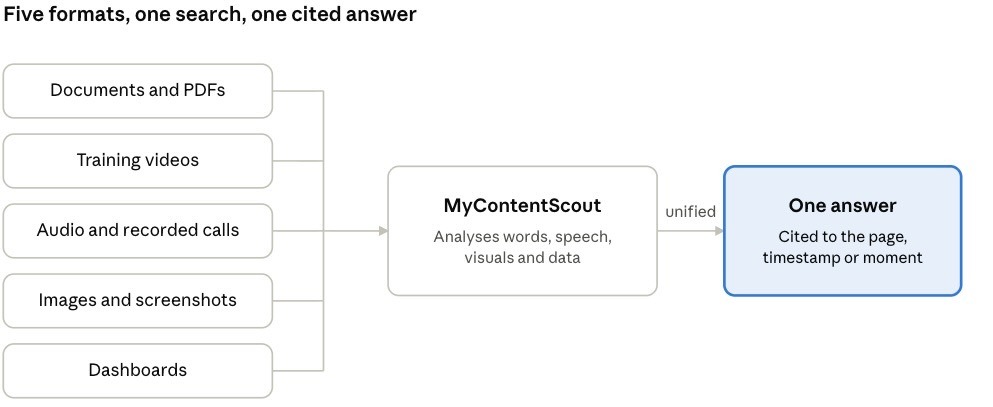
Multi-source search is the opposite of checking system by system. In MyContentScout's own words: "MyContentScout brings together documents, dashboards, videos, images, audio and more. Everything is analysed to deliver unified and highly accurate results."
In practice, that comes down to four things.
One search bar for every content type. Your team asks a question in plain English, using natural language search, and doesn't need to know where anything is stored or what format it's in. That's what it means to search across multiple content types without switching tools.
Everything is analysed, not just file names. MyContentScout looks at the words inside documents, what's said in videos and audio, and what's shown in images and dashboards. Spoken content becomes searchable in the same way as text, which is the job speech recognition was built for. A recorded briefing becomes as easy to find as a policy, so you can finally search video and documents together.
Unified results. Instead of four lists of links, the pieces from different formats come together into one answer. This is where multimodal AI, which combines information from different types of data, earns its place. The broader idea of grounding an AI answer in retrieved content rather than a model's general knowledge was set out in the original retrieval-augmented generation research.
Cited sources. Each part of the answer links back to the exact page, timestamp or moment it came from, so anyone can check it in seconds.
You can also filter results by content type when you only want videos or only documents, and ask a question in one language to get answers drawn from content written or recorded in another.
Same manager, same customer, same jacket. This time she types one question into MyContentScout: "How do we handle a return without a receipt?"
She gets one answer. It summarises the store credit rule from the policy PDF, links to the exact moment in the training video where the till override is shown, and adds the loyalty card exception from the regional manager's briefing, with a timestamp. Every part is cited, so she can check it before the customer has finished their sentence.
Before: she searched one system, found the policy PDF and stopped there. The video and the briefing were never checked, so she gave a confident but partly wrong answer.
After: she asked once and got the policy, the right moment in the training video and the briefing exception together, each with its source. The answer was complete, consistent and easy to check.
We've looked at how one platform serves every department before. The format angle matters most for teams whose answers rarely sit in a single file:
In each case, an AI knowledge platform is only as useful as the formats it can read.
You don't need a new tool to spot this problem. Ask three questions about your own organisation:
If any answer surprises you, that's the gap multi-source search closes. It's also a close cousin of a wider issue we've covered: your business knows more than it can access.
Start a free 30-day trial of MyContentScout. Upload up to 1,000 pieces of mixed content, including documents, videos, audio and images, and ask the questions your team asks every week. You'll quickly see how much of each answer was sitting in formats you couldn't search.
Not ready to trial yet? Take the free two-minute Knowledge Friction Assessment to see where your team is losing time and accuracy.





Get in touch with our team to arrange a demo of MyContentScout and see how it could transform your workflow with AI search, content analysis and categorisation, saving you time and providing smart insights from various sources.